Network Monitoring Tools That See Every Device

Find every device on every network you manage, and catch problems before your users do. Domotz identifies devices at layer 2, so a device keeps its identity when its IP address changes, and the alerts you get are worth reading.

★ G2 4.8 · 3,600+ customers · 40K+ networks · SOC 2 + ISO 27001

Pricing starts at $35 per network. 14-day free trial, no credit card required. Volume discounting available.

Accurate inventory:
Layer-2 identification means no disappearing devices and no duplicates.

Every site covered:
Deploy monitoring to all of your networks, not only the largest ones.

Every technician:
Junior helpdesk to senior engineer, with no specialist bottleneck.

Why Network Monitoring Tools Leave You With Blind Spots

IP-Based Identification Loses Devices

Most tools track a device by its IP address. When that device changes IP, moves subnet, or cycles offline, it can be flagged as brand new or vanish from inventory entirely. Your team then spends its time mapping IPs back to MAC addresses instead of fixing the issue.

Noisy Alerts Get Ignored

Unstable device identity produces alerts nobody trusts. Once a team learns to dismiss them, the one alert that mattered goes with the rest. Accurate identity is what makes an alert worth acting on.

Price Decides Your Coverage

When monitoring costs too much per site, you deploy it to your largest networks and guess about the others. Every unmonitored site is a place where problems surface only after someone calls you.

Network Monitoring Tools

See Every Device the Moment It Joins

Domotz discovers every device on the network and identifies it at layer 2, so a device keeps its identity when its IP address changes. Your inventory stays correct without anyone reconciling it by hand.

  • Automatic discovery, no manual inventory
  • MAC-based identity, so no duplicates and no ghosts
  • Alerts that reflect a real change, not a new DHCP lease

What Teams Report After Switching to Domotz

0

faster deployment

0

cost savings compared to competitors

0

deployment across all locations

0

days to full deployment

Network Monitoring That Allows You To Identify and Resolve Issues Faster

Alerting

Alerts That Mean Something

Set thresholds on availability, latency, and packet loss, then route them to whoever covers that site. Devices are identified at layer 2, so a new DHCP lease never fires a false alarm.

Layer-2 Identification

A Device Stays One Device

Domotz identifies every device by its hardware address, not its IP. When the lease changes, the record does not, so your history and your alerts stay attached to the right thing.

Live Topology

See What Sits Behind What

Domotz draws the topology from the same scan that finds your devices, and keeps it current. When something goes down, you can see what else is affected before anyone calls.

SNMP Monitoring

More Than a Ping

Prebuilt SNMP templates for common vendors pull port status, throughput, and error counts. You find out a switch is struggling before it stops answering entirely.

Remote Access

Get to the Device

Open a secure connection to a device interface over HTTPS, SSH, RDP, or Telnet. No site-to-site VPN, no jump box, and nobody has to be on site to let you in.
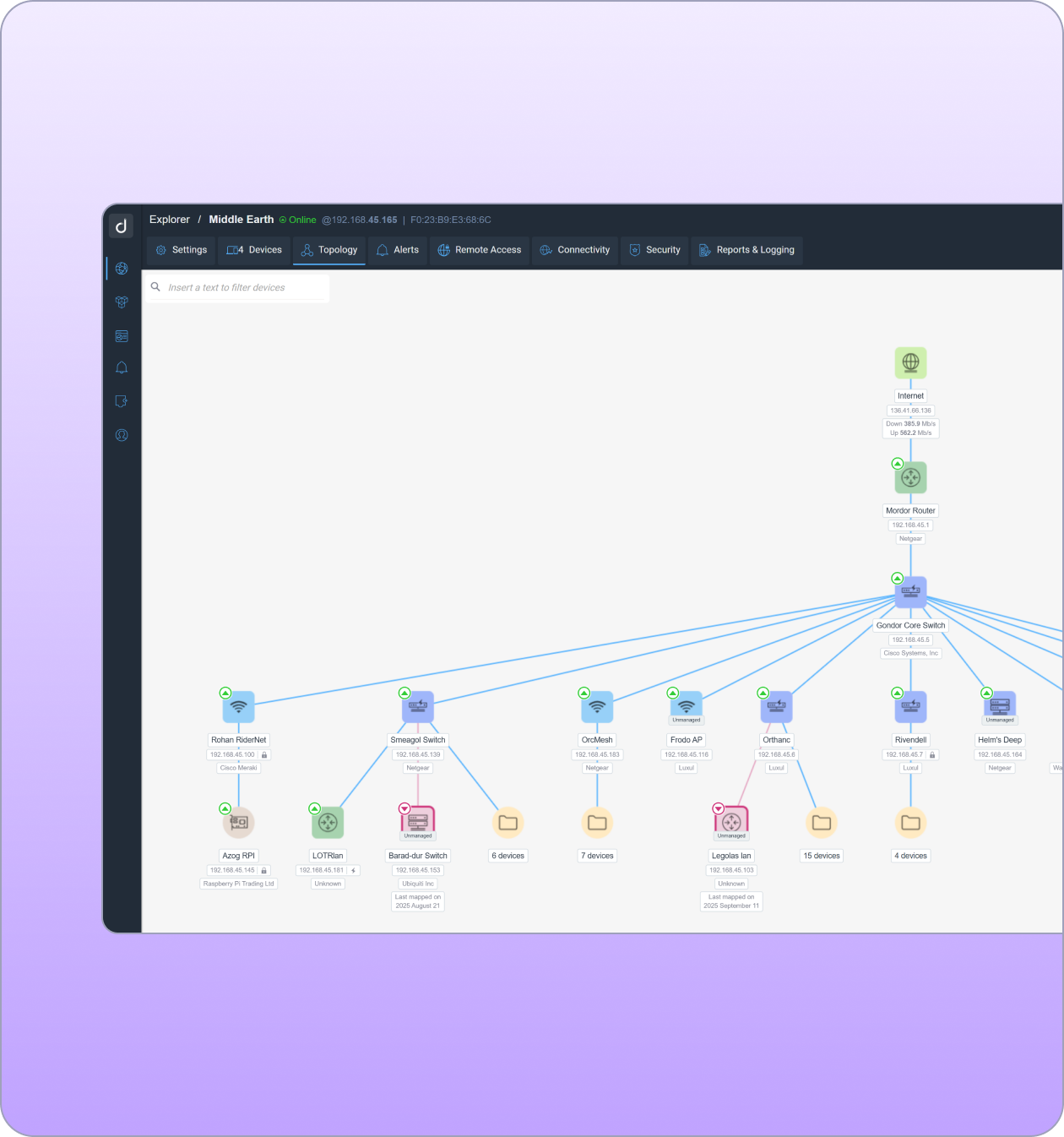
Live network topology map

Your Agentic Partner for Network Monitoring and Management

Domotz offers an MCP server that lets IT teams and AI agents run the same networks from the same platform. They can query inventory, investigate issues, apply configurations, and remediate devices through any major AI client.

Mcp server image
Start Free Trial

14-day free trial. No credit card required.

What Teams Say After They Can See Everything

Before Domotz, we had no idea what was plugged into our networks. Now, we see everything — switches, servers, access points — across 45 sites. We’ve even discovered rogue devices and hidden switches that had been forgotten in ceilings for over a decade.

Richard Connor, IT Operations Lead, TKAT

Domotz gives us complete visibility across every property - we always know what’s happening. We moved from reacting to problems to actually preventing them and Domotz is a big part of that.

Clayton Burnett, Director of Technology, Watchtower Security

Before Domotz, we’d realize a device existed only when something went wrong—or worse, when a client told us. Now we see it all, the moment it shows up.

Rex Cooper, Technical Support Specialist, CIO Solutions

It does allow us to get to the heart of problems really, really quickly because we have a portal of information that says: what’s the connectivity been? Is this device actually online? When was it last rebooted?

Craig Sharp, Founder, Abussi LTD

We now provide monthly reports in our Quarterly Business Reviews (QBRs), showing customers real uptime data and performance insights. It reassures them that their networks are truly being monitored 24/7.

Kevin White, CEO, TRINUS Tech

Our goal is to call clients before they call us. If their internet goes down and we’re the first to say something, they know we’re watching and we’re on it. That’s how trust is built.

Danial Bulloch, Director of Technology, Network Essentials

Frequently Asked Questions

What does Domotz cost?

Domotz is $35 per Collector per month. A Collector covers a network, and every device on that network is included, so the price does not climb as you discover more devices or add more sensors. Pricing is published rather than quoted, and the 14-day trial needs no credit card.

What does Domotz monitor?

Any device with an IP address on the networks you connect it to. Switches, routers, firewalls, access points, servers, printers, cameras, and the devices nobody wrote down. Discovery is automatic, so you do not build the inventory yourself.

How long does it take to set up?

Deploy a Collector at a site and it discovers the network within minutes. Most teams have their first site monitored in about 15 minutes, and the Collector runs on hardware you already have or on a Domotz box.

What is layer-2 device identification, and why does it matter?

Domotz identifies devices by MAC address rather than by IP address. When a device changes IP, moves subnet, or reconnects, it stays the same device in your inventory with its history intact. Tools that identify by IP can report that device as new, or lose it. On some networks more than 20% of IP addresses change every day, so this is the difference between an inventory you trust and one you reconcile by hand.

Do I need a VPN for remote access?

No. Domotz opens secure connections to device interfaces over HTTPS, SSH, RDP, and Telnet without a site-to-site VPN, so you can diagnose and fix remotely.

Start Monitoring Your Network in 15 Minutes

  • Discover, monitor, and manage every device
  • 14-day trial with full features
  • Unlimited sites and networks
  • No credit card required

SOC 2 and ISO 27001 certified